
Where the next client comes from
Most advisors win work through referrals and reputation, and both are slow. The gap between engagements is usually spent on outreach to companies that may or may not care. Prospecting narrows that list to companies in your industries and regions that have a visible reason to talk to someone like you right now, and it gives you the research to open the conversation with something useful.
Prospecting is part of the Haycion Advisor Network, on the Practice plan and above.
The Advisor Network
The Advisor Network is Haycion’s public directory of the consultancies, agencies and fractional executives that use it, listed by specialism, industry and location. A practice joins by building a workspace for its own firm; the listing describes what the firm does, who it serves and how it works, and the firm manages it from that workspace. Prospecting reads that listing to decide which companies to show you.
What a prospect is
A client’s AI agent is the client’s public, structured profile that Claude, ChatGPT and other AI assistants read, plus the research that works for the client: their market, competitors and vendors. You build it in the client’s workspace and run its visibility check whenever you want, to see whether AI assistants recommend the client and who wins instead.
Every profiled company has an AI agent, whether or not anyone looks after it. A prospect is a company whose AI agent no one manages yet and whose public activity is picking up: AI assistants reading its profile more often, more people viewing it, rising search interest, or a mention in a published comparison. Activity is compared across two 28-day windows, and a company makes the list when at least one of those is rising or its overall traction is high.
Some companies are never prospects. A company that has already claimed its profile, one that is already in any workspace, one that asked to be removed, one that started claiming its profile in the last 30 days, and any firm listed in the Advisor Network itself are all left out.
Traction is shown as a band (high, medium or low) and each metric as a trend. You never see a count or a score, for any company.
Matched to your listing
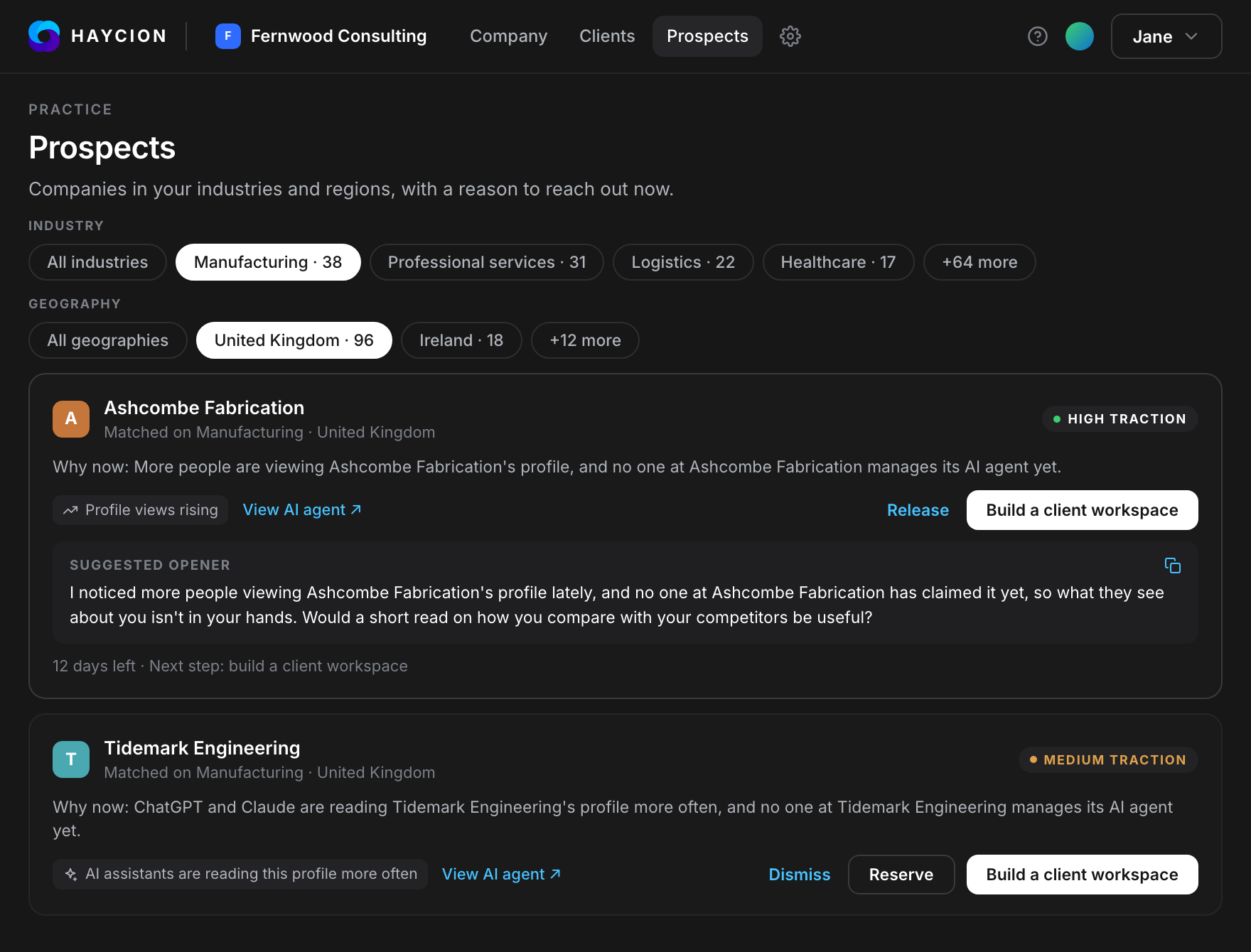
Prospects are matched on the industries, regions and specialisms in your Advisor Network listing and sorted by how well they match, then by traction. The list is rebuilt once a day. You can filter it by industry and region, and dismiss a company you are not interested in.
Find, reserve, research, pitch
Find. Each prospect shows why now in one line, for example: “ChatGPT and Claude are reading Acme’s profile more often, and no one at Acme manages its AI agent yet.” The reasons behind it appear as chips on the card.
Reserve. A prospect you reserve is yours alone for 14 days, and no other advisor sees it while you work it. You can hold up to 5 reservations at a time, and release one whenever you want. Released and expired prospects go back into every matching advisor’s list.
Research. From a reserved prospect, build a client workspace in one step. In about an hour, not days, you have the company’s baseline, its competitors, where it stands on the Strength Matrix and what AI assistants say about it. Building the workspace restarts the 14-day clock once, so you have time to pitch and then time for the company to act.
Pitch. Every reserved prospect comes with a suggested first line you can copy, written from the same public signals. For the example above: “I noticed ChatGPT and Claude have been reading Acme’s public profile more often, and no one at Acme has claimed it yet, so what they say about you isn’t in your hands. Would a short read on how you compare with your competitors be useful?” The workspace you built is that short read.
If the company claims its domain from the client workspace you built, the reservation converts: the company is now your client workspace and leaves the list for good.
Where it lives in the app
In your practice’s own workspace, Prospects is a section of the Selling page, next to battlecards and comparisons, and the Selling card on the workspace home shows how many prospects match your listing. The full list, with filters, reservations and the suggested first lines, opens from that section. On the Consultant plan, the section shows how many companies match and a preview of the top matches; the full list needs the Practice plan. Plans are on the pricing page.
See what buyers and AI read about your practice.
Free to start, no credit card.